Distressing artwork and distressed printing

27 January, 2009 – 2:16 pm

Distressing is popular. If you’ve ever seen shirts that look like they’re really old, and that the print is worn, but you know that the shirts are new or relatively new, then the artwork was probably just “distressed”, which is a process to make it look cracked, old, worn out, etc.  I’ve printed distressed artwork a few times, but last week was the first time I did the effect myself to artwork. It’s pretty easy.

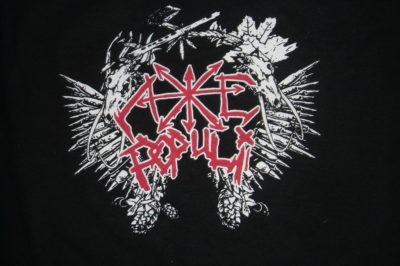
Basically, you just create the distressed effect in Photoshop. You could probably do it in Illustrator as well, but I used Photoshop so that is what I will cover. I took a distressed effect graphic and used it over the artwork the customer provided. Go here on screenprinters.net, and scroll down to Distressed Look Overlays. Download those files (thanks to Scott Fresner for providing them!). Then load your artwork in Photoshop as well as one or more of these Distressed Overlay files. Simply use the magic wand to select all of the distressed effect then paste it on top of your own artwork. You can then use Fill (hit Ctrl+f5) to change the distressed portion to white or otherwise your background color, and the distressed layer will block your artwork, making it look distressed! Easy enough, right? I hope that makes sense. Play around with it. There are four different types of distressed effects at that link, ranging from really small in detail, to larger. I used more than one to get this result on the Frat shirts I did last week:

You can of course do it to multiple color artwork too! Just make sure the distressed layers are on top of the actual art layers, making them the same color as your background (white for printing films.)

So that’s the artwork portion, and illustration of the end result, but let’s not forget the key portion between artwork and end result, that is, the actual screen printing! Distressing is easy on screens, because instead of trying to take out small or even tiny portions of the screen/stencil, you’re leaving small pieces, which is always easier. I used 230 mesh count screens, but even with low mesh screens, low to medium detail distressing would work fine. Just burn your screens as normal and they should wash out fine, creating the distressed stencil. Here is one of the screens from that print run:

There you go! There are several threads on The T-shirt Forums about this process if you want to learn more.

Someone asked in a comment a while ago if I was ever a teacher. The answer is no, never formally. I was very active with WKDU, Drexel University’s student radio station and I instructed new DJs there, and also tested them when I was Program Director.  I’m really into Krav Maga and want to be an instructor at the school in a year or two, when I’ve worked up to become a Green Belt. Right now I’m a Yellow Belt, so I’ve got a ways to go.  I have taught other people about screen printing, and am doing a private lesson next week. If you’re in the Philadelphia area and are interested in taking private lessons with me, please get in touch with me. My phone number is at the top of the page.

Business is very slow but I will try to blog and at least post pictures as interesting work comes along.

Post a Comment