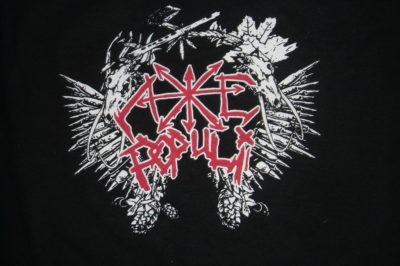
Best discharge red I’ve ever produced.

8 January, 2009 – 1:11 pm

Well it’s been a while since I’ve blogged. When I first decided to start blogging I wrote a long list of topics and then continued to come up with topic ideas, but I have written about all of those by now and new ideas aren’t coming to mind often.  My business is very slow so I am not working a lot and thinking of new topics nor am I producing shirts worth talking about. But I will try to blog at least once a week from now on. If you have topic ideas, please please email them to me . I have started using twitter, which I sort of hate but am rather hooked on, and I do sometimes mention what I’m working on, so if you want you can check out my twitter.

Anyway, I did some shirts for a local band called Axe Populi. I don’t know what they sound like but their artwork was pretty cool and I know a couple of guys in the band so I was happy to work for them. It was a white and red design on black shirts, a very common combination, but one that can be an intimidating combo for waterbased printers.  With WB inks, you can’t do red on top of a white underbase like you can with plastisol, because you get pinkish. You can supposedly use a clear coat between the white and red but that adds another screen/color and I’m not into that.  So what I do is use white-pigmented discharge (Matsui Discharge White) and pigment some red discharge (Matsui DSPF binder).  Pigmenting discharge can be a pain, as it takes a while and can lead to unfavorable results. In the past I’ve just used Matsui’s Neo Red MFB pigment added to straight discharge and it can give a nice red, but generally a darker, almost bloody red. This order called for a bright red, which I had never quite gotten before with discharge. I mixed some discharge and added a lot of Neo Red and test printed and it was a red certainly but not what I wanted, so I added some PC Red 032 pigment, which is an orangish red, and it definitely made it brighter. I added a little more Neo Red, test printed and saw that I had finally gotten a good bright red! I made extra as I always do (I don’t want to ever run out during a print job) and I’m saving it to make some Krav Maga shirts for my school.  I printed 30 of these shirts in 20 minutes, doing wet-on-wet with red first.

The up-close shot shows the color of the red better, brighter, like it actually was.

I did these through 160 mesh screens. My exposure unit, a HIX tt180, uses multiple sources of light to burn screens, which is causing light scattering, which is shrinking stencils relative to their films in white mesh screens so I had to stroke the red layer of artwork a couple of pixels in Photoshop to try to alleviate this so that these two colors would still butt properly.

It felt good to be printing again after the slow holidays.

Post a Comment